Converting a Cardo Freecom 2X to a 4X
Earlier this year I bought a Cardo Freecom 2X to install on my bike helmet. It allows me to listen to music, take phone calls, and intercom with 1 other rider. Cardo also sells the Freecom 4X, which allows you to intercom with 4 riders and has voice control. The two models look nearly identical, which made me wonder if it's just a software limitation. I spent some time reverse engineering my 2X model and was able to enable the additional intercom channel! I also created a web app to allow you to do the same.
TL;DR: Use the web utility here to convert your own Freecom 2X and enable the additional channel.
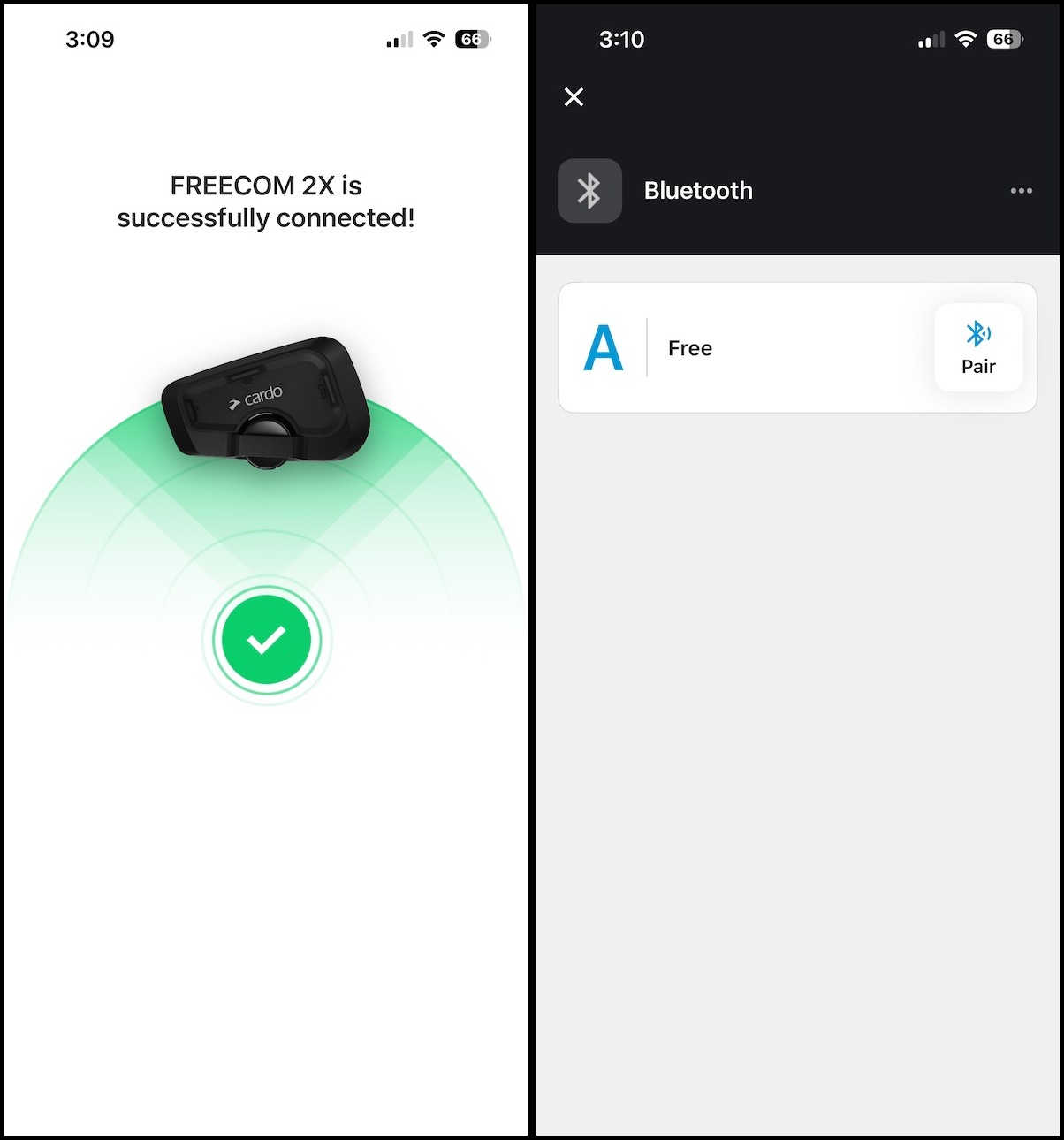
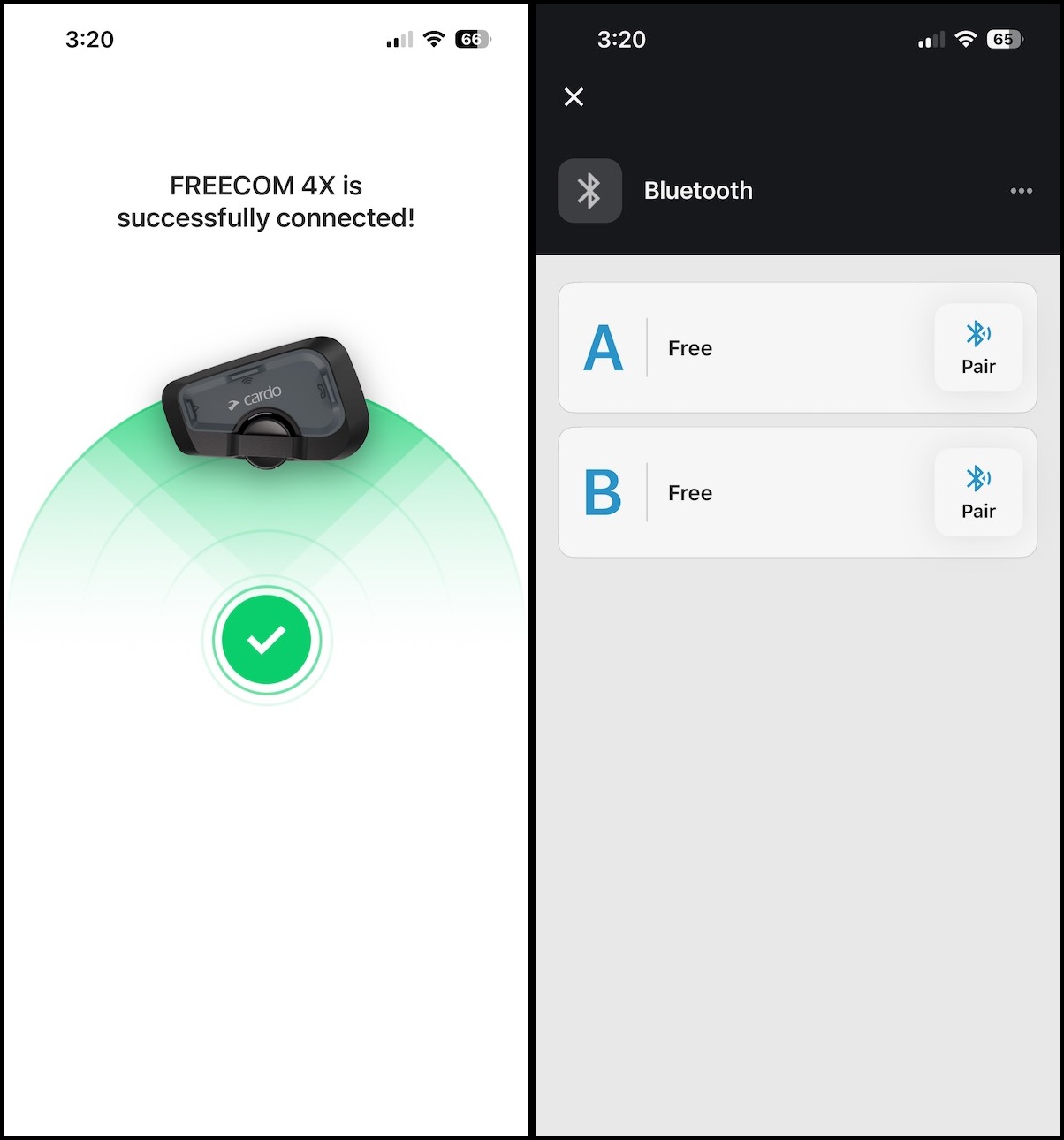
Here is a high level overview of the process I took for upgrading my 2X to a 4X (mostly)
The first step was checking the FCC records for Cardo devices. If you're unfamiliar, in the US devices are required to follow certain regulations related to wireless transmissions. To ensure the standards are met, independent testing is performed and sent to the FCC. These reports are available for anyone to see at the FCC ID website
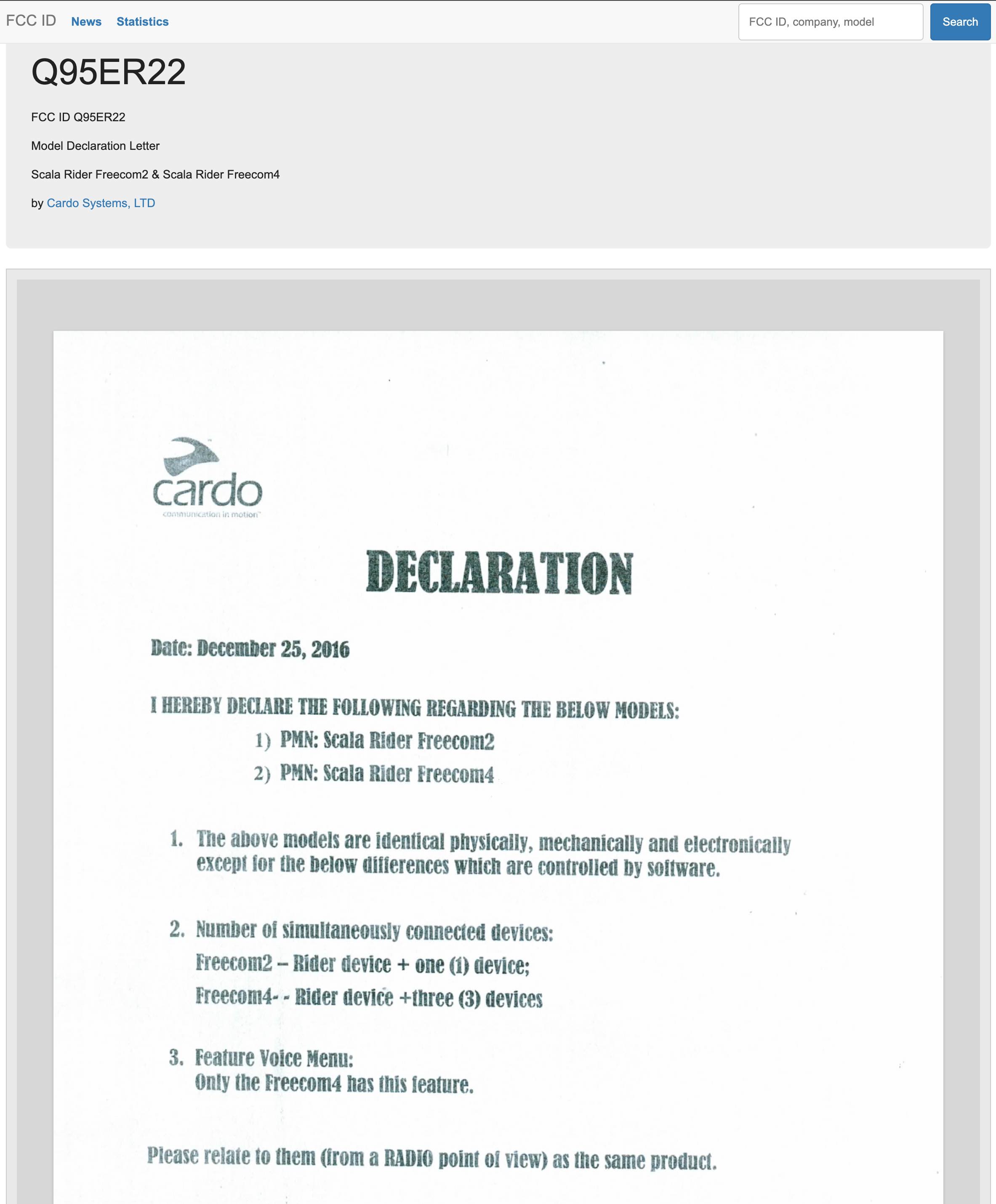
Here is the listing of documents filed at the FCC related to the Freecom 2X and similar models. Among various test reports and filings containing internal photos of the device, there is this document - which confirms that the Freecom 2X and 4X contain identical hardware and only differ in software!
After this finding I thought maybe they differ via firmware, and maybe I could manually flash the 4X firmware onto a 2X device. After unpacking the Cardo updater app for Mac I found where it checks for firmware updates. It checks a JSON endpoint, using the model identifier in the URL.
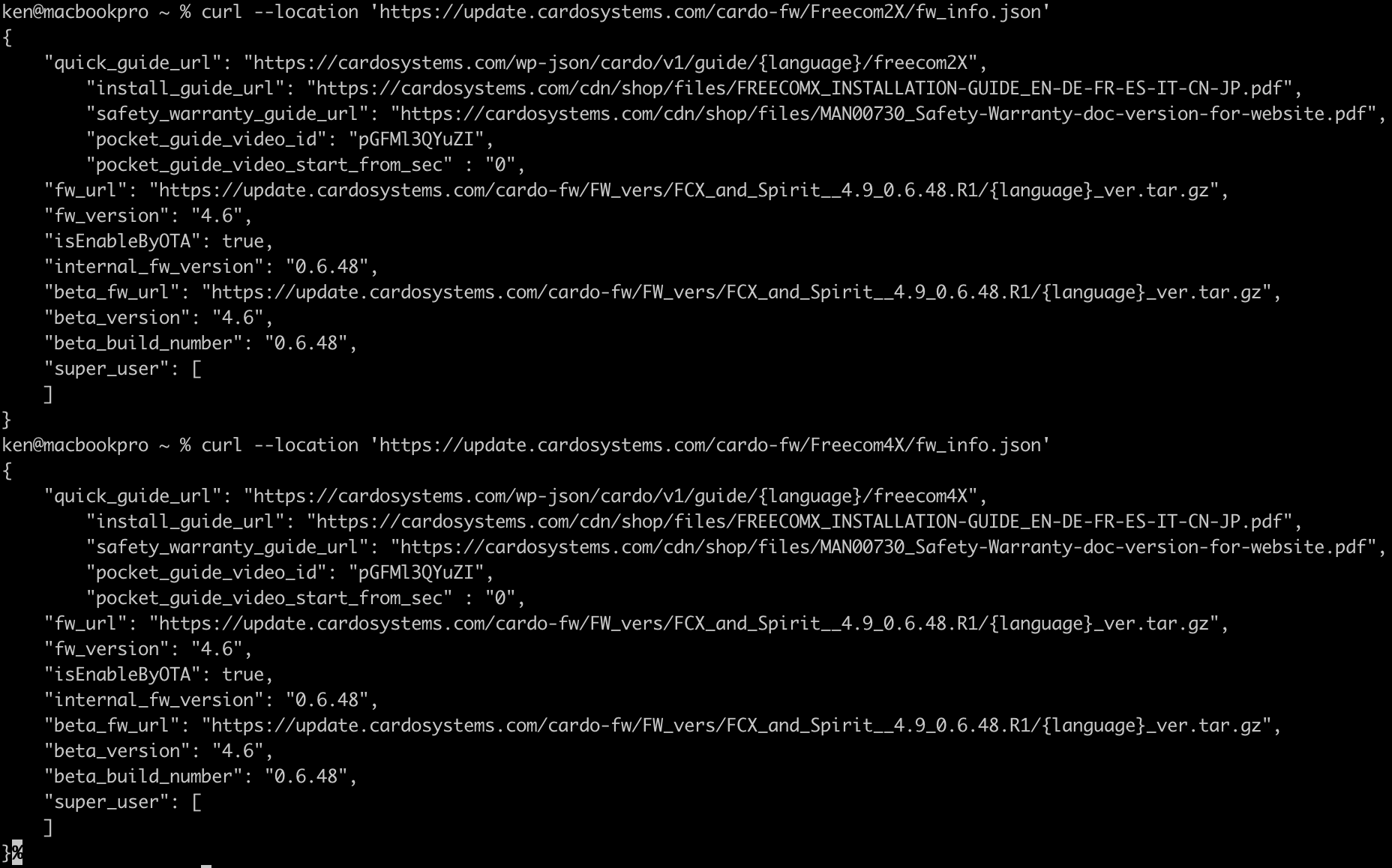
Both the 2X and 4X endpoints use the same exact firmware, so this appears to be a dead end.
Next, I grabbed the firmware to do some basic analysis. After extracting the tarball Binwalk was used on the resulting .bin file. Contained within was an XML file confg_definition that appeared to
contain mappings of many configuration values to some location:
<ConfigSet
    SwVariant="Headset-Gaming"
    HwVariant="QCC5127-AB_DEV-BRD-R2-AA" >

    <DefineGroup >
        <DefineBlockList >
            <enum
                value="33"
                key="Cardo Config Data" />
            <enum
                value="43"
                key="BT Friendly Name" />
            <enum
                value="57"
                key="Cardo Serial Key" />
            <enum
                value="69"
                key="Cardo Future Data" />
            <enum
                value="73"
                key="A2DP Config" />
            <enum
                value="81"
                key="A2DP Session Data" />
                ...
It appears to be configuration data that lives on the device outside of the firmware image, allowing for updates without losing configuration. It also tells us that the device is based on the Qualcomm QCC5127 Bluetooth SoC.
Aside from that, strings for various models were found in the binary: FREECOM, 4X, FRC4XHD, 2X, FRC2XHD, FC_4X, etc - just another confirmation that they share identical firmware images.
At this point the Cardo updater app was explored a bit more to understand how it determined the model from the unit during firmware updates. It appears that the first 2 values of the device serial number is used -
XT -> App detects a Freecom 2X
XF -> App detects a Freecom 4X
A bundled library, libcfu.dylib, was discovered as what actually handles the communication between the updater and the Cardo device. With a custom Python script I was able to put the device into QBTM (Qualcomm's device maintenance mode over USB) configuration mode. I was then able to set new values for config blocks 33, 43, and 57 (from above), with the values being:
Block 57: Change 58 54 (XT) to 58 46 (XF)
Block 43: FREECOM2X -> FREECOM4X
Block 33: Change the first 2 bytes from 54 00 to 46 00
Reading the blocks back from the device made it appear that the changes were successful, but upon exiting QBTM configuration mode the Cardo app still detected it as a 2X. Reentering QBTM config and rereading the values confirmed that they had reverted back to their original values. After a few more attempts and further scrutiny of the library I determined that this was a dead end. These config blocks were runtime mirrors and writes were not persistent.
At this point I switched focus from USB to Bluetooth communication. The Cardo advertised Qualcomm GAIA (Generic Application Interface Architecture) over Bluetooth RFCOMM (essentially serial over Bluetooth).
UUID: 00001107-d102-11e1-9b23-00025b00a5a5
Vendor: 0x000a
Another Python script was written to enumerate via GAIA protocol the PS keys (Persistent Store key), which are values in an internal key-value configuration registry used by Qualcomm QCC chips. We should specifically
look for info in the "Customer key" namespace, as that can be used by device manufacturers to store custom information, like config values. Using the PsFullRetrieve Qualcomm API the entire PS key namespace was enumerated.
Ultimately the config data was located:
0x27e0: model/config
0x27e2: device serial
0x27e9: product name
Once these were located I tried writing over them with another script using the STORE_FULL_PS_KEY command found in a decompiled version of the Cardo Android mobile app apk, but the device rejected the command. Instead, the PsStore api was used.
This api doesn't expect the full PS key address but instead a shorter id known as the Apps-index store. The addresses translated as:
0x27e0 -> 0x00d8
0x27e2 -> 0x00da
0x27e9 -> 0x00e1
The script was updated to use the PsStore api with the translated addresses and the writes appeared successful! Something to note is that the device has really weird padding requirements for written values. You basically need to double
the length of the value you want to send, minus two. Use that length as padding at the end of the value - so XT5339C448 is written as XT5339C44800000000. Otherwise, the value gets truncated.
After the successful writes I re-paired the Cardo to my phone via Bluetooth and opened the Cardo app. It now reported that it was a Freecom4X - and I had the ability to pair an additional intercom channel!
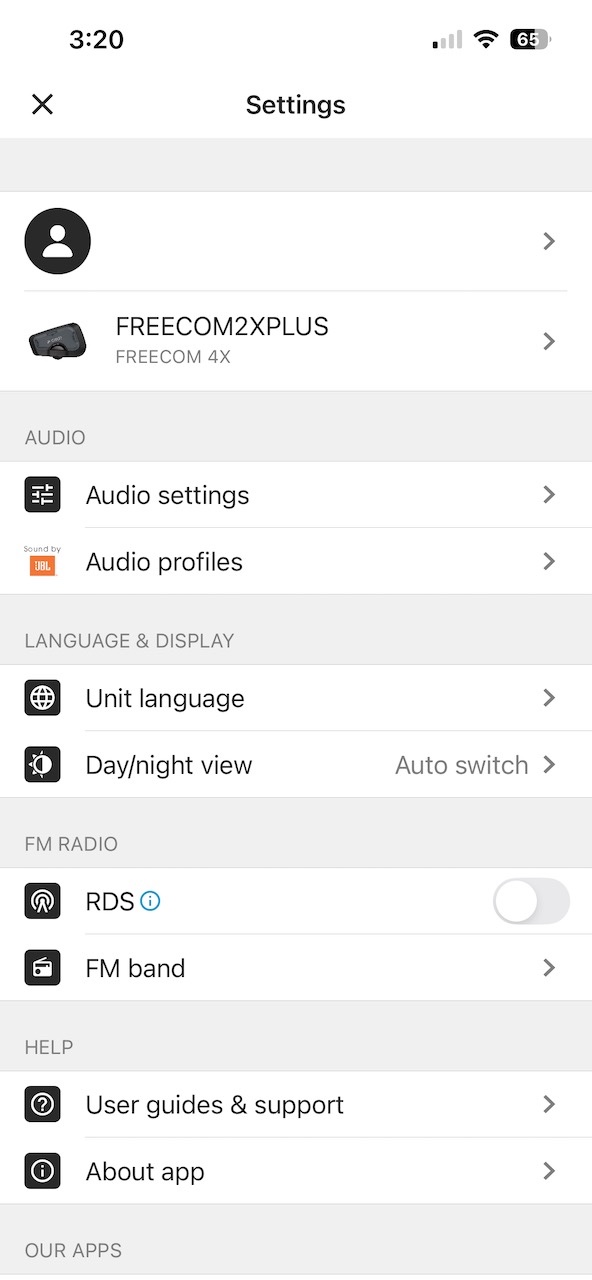
Unfortunately this didn't seem to enable the "hey cardo" voice control that the retail Freecom4X has. This is gated by a license implemented by the Qualcomm QCC chip itself, not via the Cardo firmware. I may continue exploring that at another time, but for now I'm happy with enabling the additional intercom channel.
Note: This is the first time I've used an LLM to assist with a reverse-engineering project. While I've done my fair share of reverse-engineering manually in the past, using an LLM unlocked a whole different level of speed and analysis. Analysis that may have taken days in the past was done in just a few minutes. I was also able to run experiments and iterate over ideas way faster. I used OpenCode as my local agent harness (though I want to experiment with Pi in the future) paired with a mix of models like GPT-5.6 Sol, GPT-5.5, Claude Open 4.5, and MiniMax M2.7 depending on the specific task.